Chrome extension Β· open source

Every app's real numbers, right on Google Play

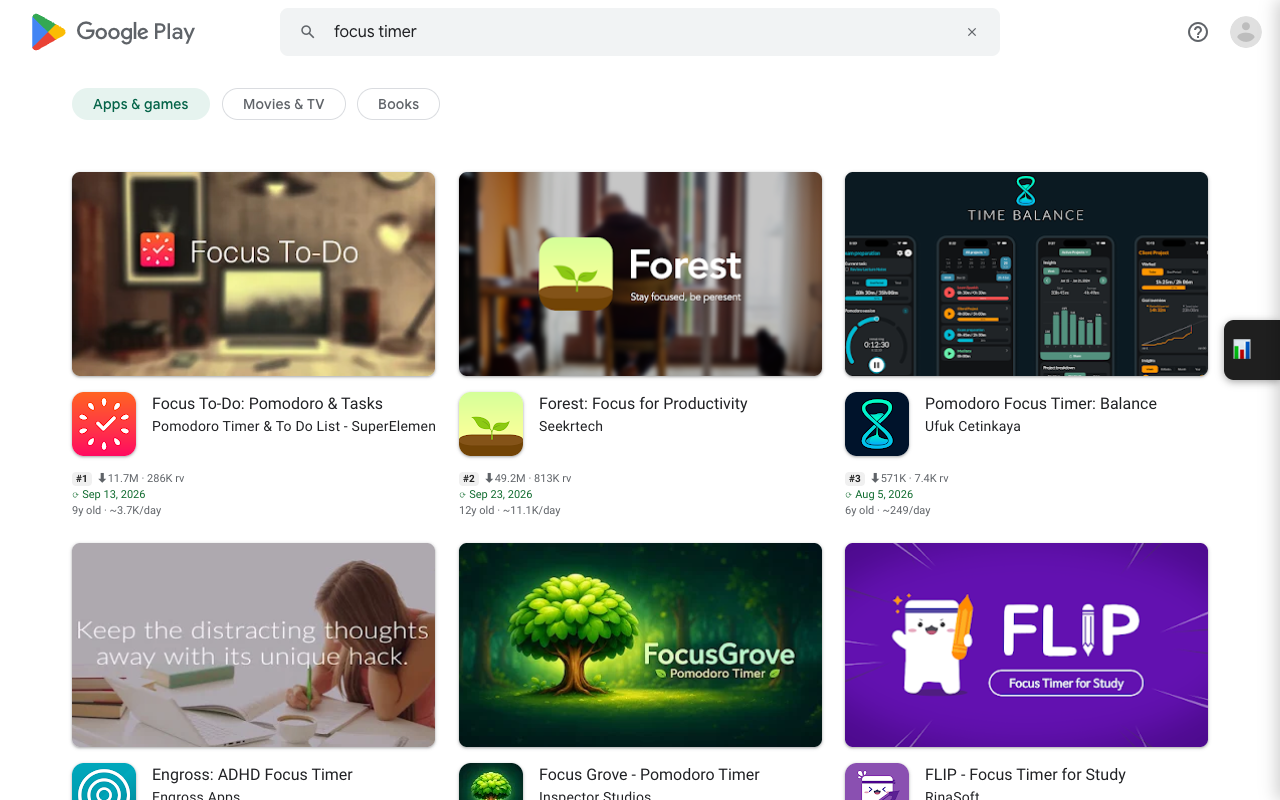
Exact installs, ratings, app age and last-updated dates under every app card β€” in search, on developer pages and in collections. Then compare, follow and export them from one side panel.

play.google.com/store/search?q=focus timer
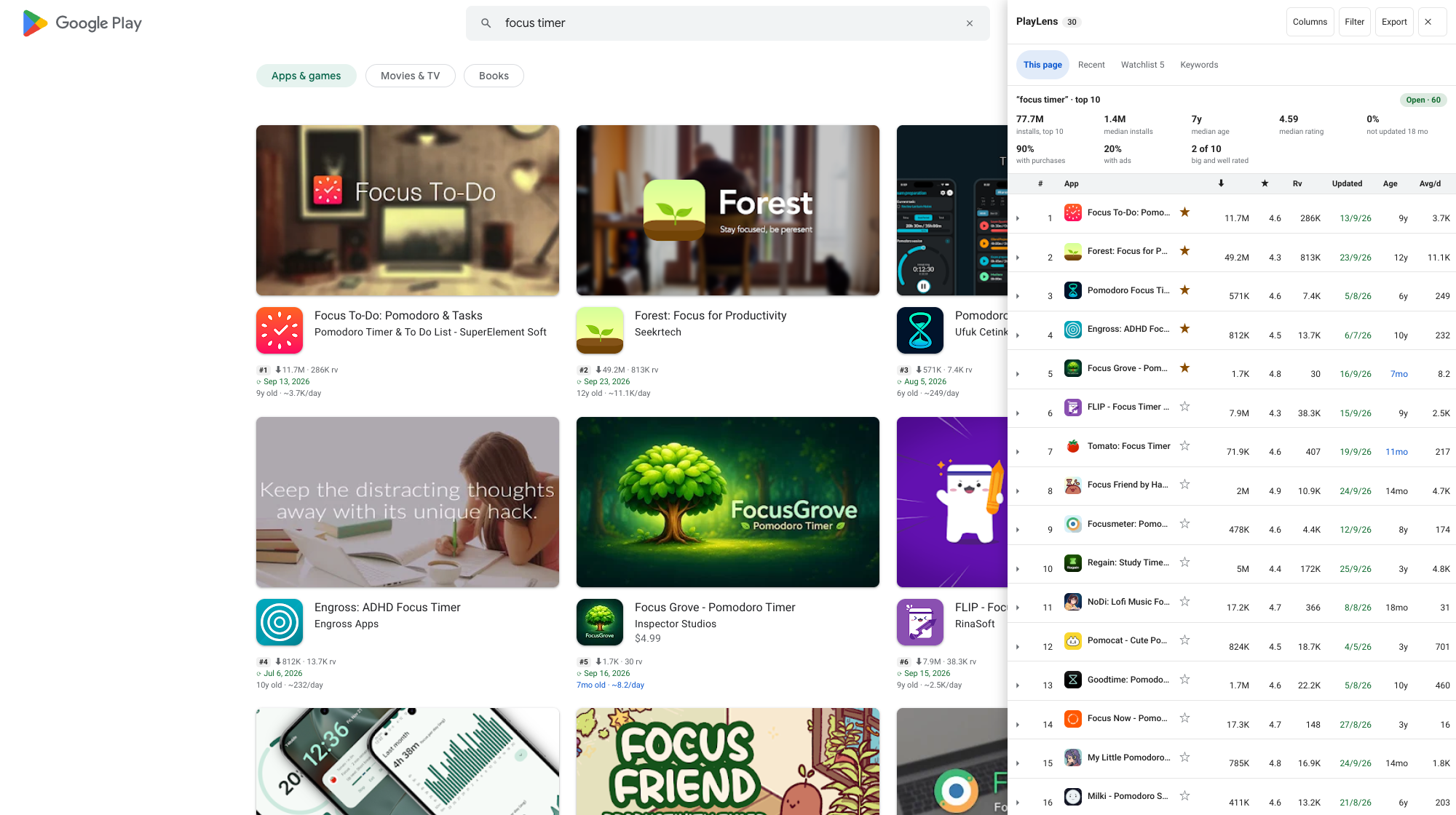
PlayLens on a Google Play search results page: rank, installs, ratings and update date under every app card, and the side panel with a summary and a sortable table
On every card

Play says β€œ10M+”. PlayLens says 49.2M.

Play rounds installs into buckets, so two very different apps look the same. PlayLens reads the real figure from each app's page and adds age, growth and freshness, colour-coded so the stale ones stand out.

How to read the info line β†’

Features

Research a market without opening forty tabs

Everything below is free unless it is marked Pro.

Cards

Numbers on every card

Exact installs, number of ratings, update date by freshness, app age and installs per day, under each card's own rating.

Guide β†’
Search

Rank on search results

Every result carries its position. The table and the exports keep it together with the search term.

Panel

Sortable side panel

Every app on the page in a table: choose columns, filter by installs, rating, age or freshness, export CSV or JSON with all fields.

Keywords

Keyword ideas with a verdict

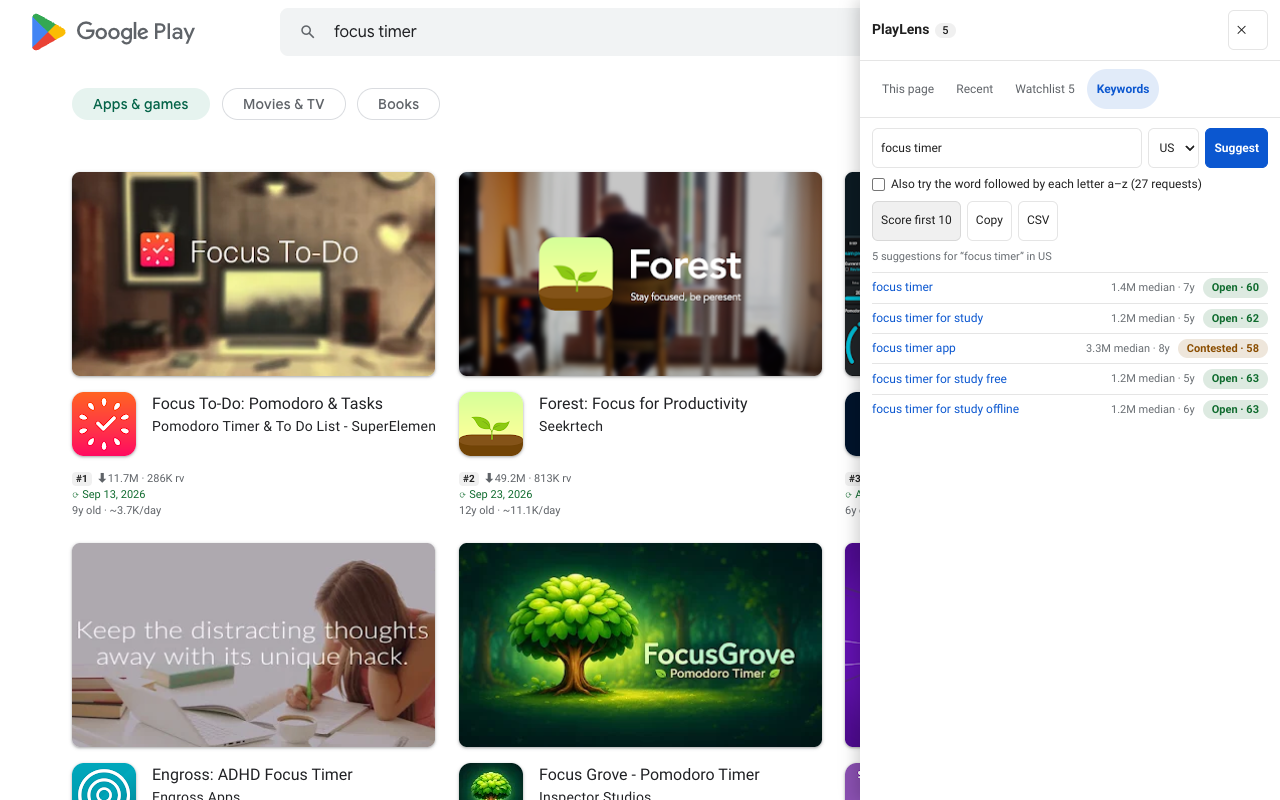
Play's own suggestions for a word, each scored Open, Contested or Crowded from its first ten results.

Guide β†’
Watchlist

Follow competitors

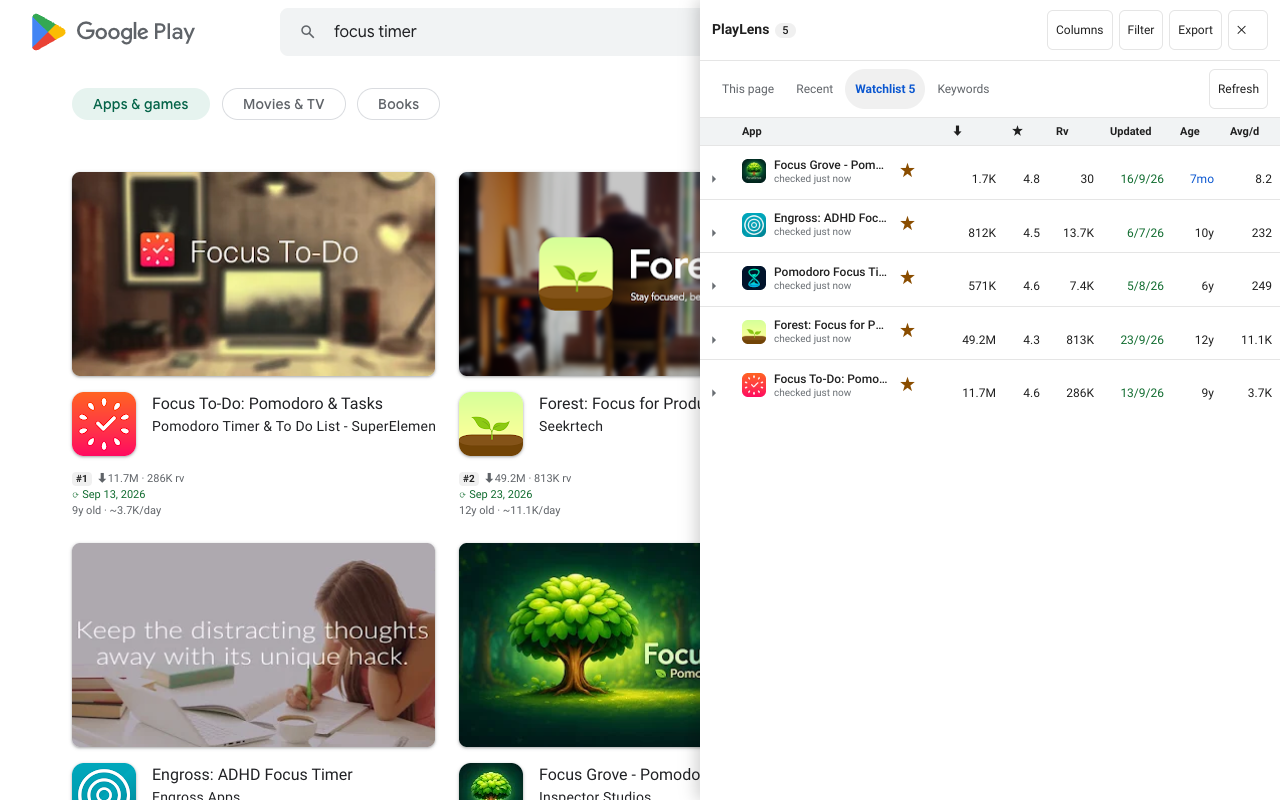
Star an app. PlayLens notes version, name, price and rating changes and measures installs per day from a daily record.

Guide β†’
Reviews

Low-star reviews

The latest 1–3β˜… reviews with the words that come up most, exportable by stars and date. Reviewer names are left out.

Guide β†’
Pro

Daily rank tracker

Follow keyword and country pairs, checked once a day in the background with 90 days of history.

Guide β†’
Pro

Compare with charts

Up to 6 apps side by side, with installs and rating history drawn in colour-blind-safe charts.

Pro

Alerts, reports, backups

Desktop notifications, a Watchlist report in HTML or Markdown, and a full backup you can restore.

Guide β†’
How it works

Working in 30 seconds

  1. Install

    Add PlayLens from the Chrome Web Store. No sign-up, nothing to configure.

  2. Open any Play list

    A search, a developer page or a collection. The numbers appear under every card.

  3. Open the panel

    Sort, filter and export the list, star apps to follow them, score keywords.

Or install it from the source
  1. Download playlens.zip and unzip it.
  2. Open chrome://extensions and turn on Developer mode.
  3. Click Load unpacked and pick the unzipped folder.
Use cases

Who it is for

Indie developers choosing an idea

See which search terms have weak, stale or small results before you build, and what the top apps charge.

ASO and growth teams

Follow where your app ranks for the terms that matter, by country, and get told when it moves.

Product managers watching competitors

Know when a rival ships a new version, changes price or starts losing rating, without checking by hand.

Researchers and analysts

Export clean CSV or JSON of a whole list with 36 fields, ready for a spreadsheet.

Pricing

Free for everything you see. Pro for what takes time.

Free

$0, no account, no time limit

  • Exact installs, ratings, age and update date on every card
  • Side panel, filters, CSV and JSON export
  • Watchlist with change detection and measured growth
  • Low-star reviews, keyword ideas, country comparison, developer pages
  • Follow 3 keywords by country in the rank tracker
  • Compare 2 apps side by side

Add to Chrome

Pro

Pro

Billed and taxed by Polar Β· cancel any time

  • Rank tracker: 150 keyword and country pairs Checked once a day in the background, with 90 days of history.
  • Alerts when a keyword moves or a watched app changes Desktop notifications, asked for only when you switch them on.
  • Compare up to 6 apps with history charts
  • Watchlist report as HTML or Markdown
  • Backup and restore of your watchlist, history and ranks
  • Saved keyword lists, β€œScore all”, opportunity by country

You get a licence key by email. Paste it in the PlayLens settings; it works on up to 3 of your browsers. Prices in USD.

PlayLens stays open source (MIT). Pro is a convenience and a way to support the work, not copy protection. The key is checked with Polar about once a day and nothing else leaves your browser β€” see the privacy policy and how the licence works.

Guides

Learn each feature

Short, practical walkthroughs with real screenshots.

All guides β†’

FAQ

Questions

How do I see the download count of an app without opening it?

Install PlayLens and open any Google Play list page. The exact install count, rating, number of ratings, last-updated date and app age appear on each app card directly β€” no clicking through.

Which Google Play pages does it work on?

Any page that shows a grid or row of app cards: developer pages, search results, category and collection pages, Similar apps, and the Play home page.

Are the review counts exact?

Yes. Play’s own cards round to something like 824K. PlayLens reads the structured data on each app’s detail page, so you get 824.1K β€” the real figure, useful when comparing two apps that both round to the same number.

Can I export the list to a spreadsheet?

Yes. Open the side panel and click Export β€” copy the table, or download it as CSV or JSON with every field, ready for Sheets or Excel.

Is PlayLens free? What does Pro add?

Everything you see on the cards, the side panel, the watchlist, reviews, keyword ideas and exports is free. Pro adds a daily rank tracker with history, alerts, comparison charts, reports, backups and saved keyword lists.

Does it collect or send my data anywhere?

No account, no analytics and no server of ours. PlayLens runs only on play.google.com, fetches the same public pages you could open yourself, and keeps what it stores on your device. The one exception is a Pro licence key, which is sent to Polar to check it is valid.

Does it work in Edge, Brave or Opera?

Yes β€” it is a standard Manifest V3 extension, so any Chromium-based browser can load it.
See the real numbers behind every Play listing

Free, open source, and nothing to sign up for.

Add to Chrome β€” it's free